
Users may set up a voicemail at no extra cost. Here are the steps to configure voicemail in the control panel:
1. Log in to the control panel.
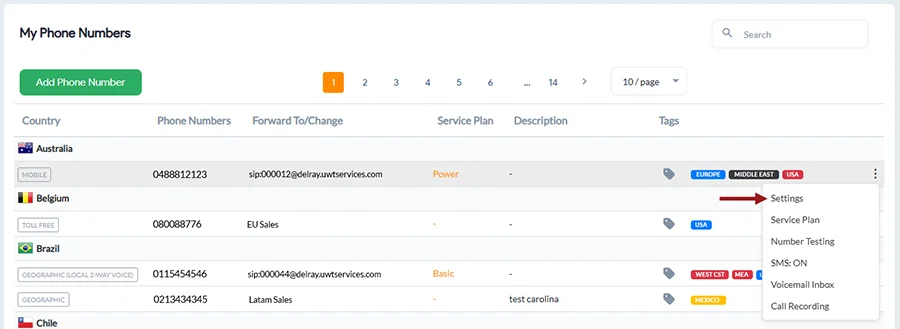
2. Click My Phone Numbers on the left-hand side of the page.
3. Click on the line that you would like to modify.
4. Click the 3 dots on the far right and select Settings.
5. Select Call Forwarding from the horizontal menu and then Voicemail from the sub-menu.
From here you will be able to set your voicemail and choose up to 2 email addresses where you would like all voicemails and faxes delivered.
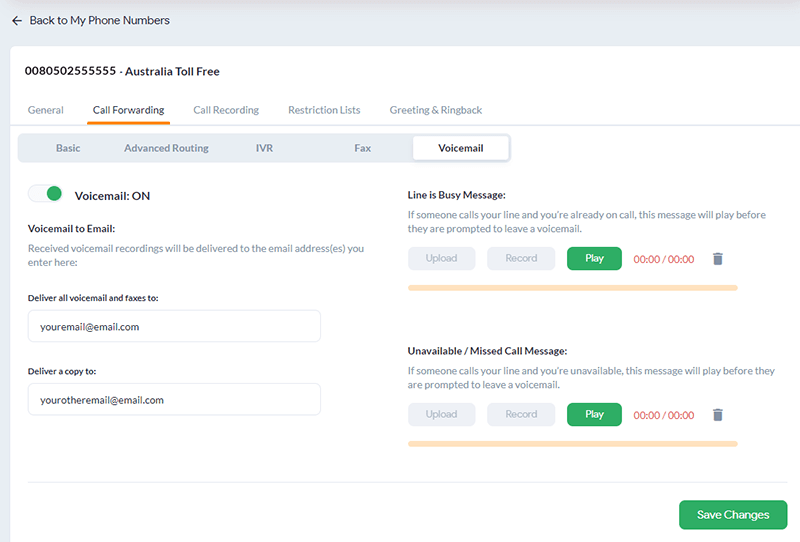
5. Upload or Record an Unavailable Message.
6. Click Save Changes.
You can also delete all voicemails and transcripts by clicking the Delete all Voicemails button or individual recordings in the Voicemail Inbox tab.